Raising Terrain
WARNING
This page is not finished.
Now that we have a ocean, it's time to raise up some land! We're going to use our first and most important tool: height.
In the left sidebar, locate the dock titled "Tools" and click the button with the arrows pointing up and down next to each other. You may also use the keyboard shortcut Alt+h. You know you have it selected if you see the explanation in the tool settings dock.
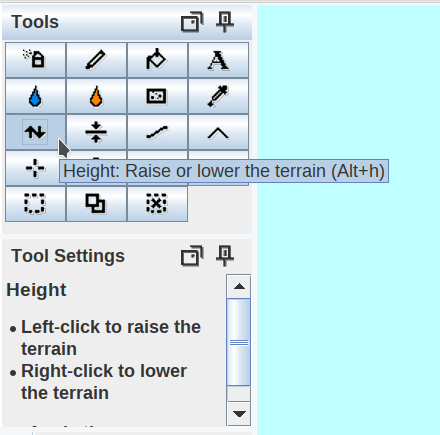
Try clicking on the map now. You should see it rise when you hold down the left mouse button and lower when you hold down the right mouse button.
You may undo your changes with Ctrl+z.
Now, let's get painting! We want to make an interesting island shape, but there's a lot of deep water right now, so let's start with broad shapes and work out more detail later. Scroll the zoom wheel until the brush size is large, around 120. You can see the brush radius in the status bar at the bottom of the WorldPainter window.
TODO:
- Broad shape
- Details
- Ensuring balanced ocean depth and slope
- Mountains
- Not too hilly